How to Get Your Products Discovered Across Google Search, Shopping, Images, YouTube and AI-Powered Search

Author: Siva Prakash
Imagine someone searching for a product your business sells. They might type a few words into Google, upload a photograph of something they like, watch a product review on YouTube or ask an AI assistant to recommend the best option for their needs. Different searches. Different experiences. But one common expectation: people want to discover relevant products, understand their options and make confident buying decisions.
For ecommerce businesses, this creates a bigger challenge than simply ranking a product page in traditional search results. Your products need to be represented accurately, your information needs to be accessible and your website needs to provide a useful experience wherever a potential customer discovers your brand.
Google's product discovery ecosystem is evolving to support more of these journeys. Product information can be surfaced through Search, Shopping, Images, Lens, YouTube, Maps and supported AI-powered experiences, depending on eligibility and availability.
This means ecommerce visibility needs a more connected approach. Google Merchant Center, product feed optimisation, ecommerce SEO, structured data, image quality and trustworthy website content should work together rather than operate as separate marketing activities.
In this guide, we explore how businesses can build that foundation, improve product discovery opportunities and prepare their ecommerce websites for changing search behaviour.
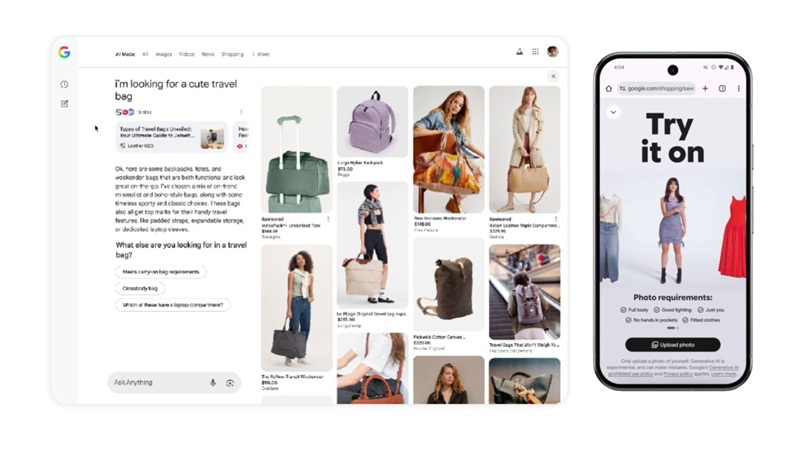
1. Product Discovery Is Changing: From Search Results to Connected Shopping Experiences
Traditional ecommerce SEO often focused on a relatively straightforward journey: a customer searches for a product, finds a website in Google, visits the product page and makes a purchase. That journey still matters, but it is no longer the only way customers discover products.
Consider a customer looking for a travel backpack. They might begin with a broad search such as "best backpack for international travel". They could then compare product listings, explore images, watch reviews, use a visual search tool or ask an AI assistant to narrow down the options based on budget, size and travel requirements.
The customer is not necessarily thinking about search engines, product feeds or structured data. They simply want useful recommendations and accurate product information.
For the business selling that backpack, however, each discovery experience depends on a different combination of information:
- Product titles and descriptions that clearly explain what is being sold.
- Accurate pricing, availability and product specifications.
- High-quality images that represent the actual product.
- Accessible product pages with useful information.
- Structured product data that helps search engines interpret the page.
- Reliable business, shipping and return information.
The strategic shift is simple: stop thinking only about how to rank a product page. Start thinking about how to make your product information discoverable and useful across the entire customer journey.
2. Understand Where Your Products Can Appear Across Google's Ecosystem
Google offers several ways for people to discover products. Each surface supports a different type of search behaviour, and businesses should understand which product information and integrations are relevant to each one.
Google Search: Capture customers with product intent
Google Search remains an important discovery channel for ecommerce businesses. Customers may search for a specific product, compare alternatives or look for recommendations before purchasing. Well-optimised product pages can help search engines understand the products you sell. Depending on the page, its structured data and Google's systems, product information may be eligible for enhanced search appearances such as product snippets or merchant listing experiences.
For example, a search for "ergonomic office chair with lumbar support" may reflect a much stronger buying intent than a broad search for "office furniture". Your product page should explain the relevant features clearly rather than rely on a generic product name.
Google Shopping: Make your catalogue available for product discovery
Google Shopping helps people explore and compare products. Businesses can submit product information through Google Merchant Center to participate in eligible product listing experiences.
Product data such as title, description, image, price, availability and identifiers helps Google understand the catalogue. Businesses can also use Merchant Center as part of their paid Shopping advertising strategy.
Google Images and Google Lens: Make visual product discovery possible
Not every customer knows the exact name of a product. Sometimes they recognise what they want visually but cannot describe it accurately. Google Images and Lens support visual discovery journeys. This makes product photography, descriptive image information and accessible product pages particularly important.
For businesses selling fashion, furniture, accessories, home products or visually distinctive items, image quality can be an important part of the discovery experience.
YouTube: Support discovery through video and product experiences
Customers often use YouTube to research products before purchasing. They watch demonstrations, comparisons, tutorials, reviews and product walkthroughs to understand how an item performs in real situations. Eligible free product listings can also appear on supported YouTube shopping surfaces. Separately, businesses can explore relevant YouTube content and shopping integrations to help customers move from product education to product discovery.
For example, a business selling kitchen equipment could publish a demonstration explaining how a product works, what makes it different and which customer needs it addresses.
Google Maps and Business Profiles: Connect online products with local intent
For businesses with physical stores, product discovery can also happen through local search experiences. Eligible local product listings and inventory information can help nearby customers find products available at a store.
This is particularly useful when customers search for products with location-based intent, such as "buy running shoes near me" or "where can I find a coffee machine nearby".
Gemini and AI-powered shopping: Prepare for more conversational discovery
AI-powered experiences are changing how people explore products. Instead of searching only for a product name, customers can describe what they need, explain their preferences and ask for comparisons. Google's shopping developments combine AI capabilities with its Shopping Graph to support product exploration and comparison. In India, Google has also introduced virtual apparel try-on experiences and shoppable product discovery features in its Gemini ecosystem.
For ecommerce businesses, this makes accurate product information even more important. Product attributes, specifications, prices, images and availability need to be clear enough to support meaningful discovery.
Important: Being eligible for a Google product surface does not guarantee that a product will appear there. Availability and display depend on Google's systems, product eligibility, market support and other factors.
3. Google Merchant Center: Build the Product Data Foundation
If your business sells products online, Google Merchant Center should be an important part of your product visibility strategy. Merchant Center allows businesses to share structured product information directly with Google. It helps communicate what you sell, how much products cost, whether they are available and where customers can find them.
It is important to understand that Merchant Center is not a replacement for ecommerce SEO. It complements your website by providing Google with product information in a structured format.
How to use Merchant Center effectively
- Set up your account correctly: Configure business details, website verification and relevant market settings.
- Submit your product catalogue: Choose a suitable integration, scheduled feed, spreadsheet or API-based method.
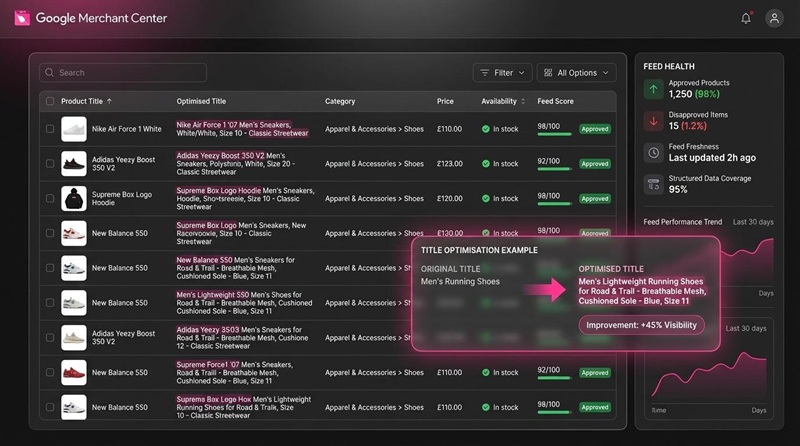
- Optimise product titles: Use descriptive, accurate titles that reflect how customers identify products.
- Improve descriptions: Include relevant specifications, features, dimensions, materials and product benefits.
- Maintain product identifiers: Provide accurate brand, GTIN and MPN information where applicable.
- Keep prices and availability accurate: Ensure the submitted data matches the customer-facing product page.
- Monitor product status: Review warnings, disapprovals and account-level notifications regularly.
One important opportunity is Google's free product listings. Eligible products may appear across supported Google surfaces without a per-click advertising charge. This can complement an existing organic search and paid advertising strategy. However, free listings should not be treated as guaranteed traffic. Product eligibility, data quality, competition and Google's display decisions all influence visibility.
If your business has not configured Merchant Center yet, start with Google's Merchant Center platform and review the relevant account setup guidance.
4. Product Feed Optimization: Give Google Better Product Information
Think of your product feed as the digital catalogue that represents your business to Google. A poorly maintained catalogue can create confusion, while accurate and detailed product information gives search and shopping systems a better understanding of what you offer.
Uploading thousands of products does not automatically create a strong product discovery strategy. The quality and consistency of the information matter.
Focus on these essential product attributes
- Product ID: A unique identifier for each item.
- Title: A clear product name that communicates the important details.
- Description: Accurate and useful product information.
- Product URL: The correct landing page for the product.
- Image URL: An accessible, high-quality image of the actual item.
- Price: The correct selling price and currency.
- Availability: The current stock status.
- Brand and identifiers: Accurate brand and product identifiers where relevant.
- Product category: Relevant categorisation to help describe the product.
- Variant information: Correct size, colour, material or other variant details where applicable.
Example: Improve a generic product title
Consider a business selling an adjustable office chair.
Less informative: Office Chair
More descriptive: Ergonomic Office Chair with Adjustable Lumbar Support – Black
The second title provides more useful product context. It identifies the product type and includes relevant features, assuming those features accurately describe the item.
The same principle applies to product descriptions. Avoid repeating generic marketing language across an entire catalogue. Explain what makes each product different, who it is designed for and which specifications customers should consider before buying.
For large ecommerce websites, establish a product data standard. This should define naming conventions, mandatory attributes, variant handling, image requirements and update processes. Consistency becomes increasingly important as the catalogue grows.
5. Ecommerce SEO: Make Every Product Page Useful to Customers and Search Engines
Merchant Center can share product information with Google, but your website remains the destination where customers evaluate products and make purchasing decisions.
A product page should answer the questions a potential buyer is likely to ask. It should not simply repeat the product name and display a price.
Build product pages around customer questions
Before optimising a product page, think about the information a customer needs to make a decision.
- What exactly is this product?
- What problem does it solve?
- Who is it suitable for?
- What are its dimensions, materials or technical specifications?
- What is included in the package?
- How does it compare with similar products?
- What are the shipping, warranty and return conditions?
Use these questions to guide the page structure, headings, product descriptions and supporting content.
Improve your ecommerce website structure
Organise products into logical categories and subcategories. Use descriptive URLs, relevant internal links and clear navigation so that customers and search engines can understand the relationship between your pages.
For example, a store selling fitness equipment could organise its website into categories such as strength training, cardio equipment, recovery tools and accessories. Individual product pages should connect naturally to their relevant category and related products.
Optimise product page performance
Page experience also matters. A slow or difficult-to-use product page can frustrate customers even when the product itself is relevant.
- Improve mobile usability and responsive layouts.
- Compress and appropriately size product images.
- Reduce unnecessary scripts and page resources.
- Use clear product navigation and visible calls to action.
- Make product prices, availability and key specifications easy to find.
- Ensure important product content is accessible to search engines.
The goal is not to optimise for a search engine in isolation. It is to create product pages that genuinely help people make informed purchasing decisions.
6. Product Structured Data: Help Search Engines Understand Your Catalogue
Structured data provides information about the meaning and content of a webpage in a standardised format. For ecommerce websites, Product and Offer structured data can communicate details such as product name, price, availability, brand, image and other relevant attributes.
For example, a product page might visibly show the name of a laptop, its price, availability and product image. Appropriate structured data can help Google interpret those details more explicitly.
What should ecommerce businesses implement?
- Product schema: Describe the product and its relevant attributes.
- Offer schema: Communicate pricing, currency and availability information where applicable.
- Product variants: Represent different sizes, colours or configurations accurately where supported.
- Shipping and return information: Include supported information when it is relevant and accurately represented.
- Review information: Use genuine, eligible review data and follow Google's structured data policies.
For ecommerce businesses, Google recommends sharing product data through both product structured data and Merchant Center feeds where feasible. These methods complement one another and can help Google understand product information more accurately. However, structured data is not a shortcut to guaranteed rankings, rich results or AI recommendations. The markup must accurately represent visible page content and follow Google's guidelines.
Read the official documentation for Google Merchant Center Setup & Optimization and Google My Business Expert: Maximize Your Local Presence.
7. Image Optimization: Turn Product Photography into a Discovery Asset
Product images are not just design elements. They help customers recognise products, understand their appearance and compare alternatives. They also contribute to visual product discovery experiences. For many ecommerce categories, the image can influence whether a customer explores a product further.
Practical image optimization guidelines
- Use clear images that accurately represent the product.
- Show the product from useful angles and include relevant detail images.
- Use appropriate image dimensions and avoid unnecessary file sizes.
- Ensure product images can be accessed by search engine crawlers.
- Use descriptive filenames where practical.
- Write meaningful alternative text that describes the image naturally.
- Keep product images consistent with the corresponding product page and feed.
- Use additional images to explain product features, dimensions or real-world use where helpful.
For example, a product image named IMG_9082.jpg provides little descriptive context to a website editor. A descriptive filename such as adjustable-black-ergonomic-office-chair.jpg is easier to manage and understand.
Image filenames and alt text should describe the actual image rather than become a place to insert repeated keywords. Accessibility and accuracy should remain the priority.
Google's image SEO best practices provide additional guidance on making images easier to discover.
8. AI Product Discovery and Ecommerce GEO: Prepare Your Brand for Conversational Search
Customers are increasingly exploring products through more conversational search experiences. Instead of typing only a product name, they may ask questions that include their budget, preferences, use case and constraints.
For example:
- Which office chair is suitable for someone working from home for eight hours a day?
- What is the difference between a basic and professional espresso machine?
- Which lightweight travel backpack is suitable for a week-long international trip?
- What should I check before buying a home air purifier?
These queries require more than a product title. They involve context, specifications, comparisons and useful explanations.
This is where ecommerce SEO and Generative Engine Optimization (GEO) can work together.
Use clear answers, not artificial keyword repetition
If a customer asks whether a particular product is suitable for a specific use, answer the question directly. Explain the relevant specifications, limitations and conditions.
For example, rather than writing a generic paragraph about an office chair being comfortable, explain the actual adjustment features, weight capacity, lumbar support design and other verified details.
This makes the content more useful to shoppers and easier for search systems to interpret.
Does GEO require a completely different SEO strategy?
No. Google's guidance for AI features in Search continues to emphasise foundational SEO, technical accessibility and helpful, reliable, people-first content. There is no special markup or guaranteed optimisation technique that ensures a website will be included in AI-generated answers. For ecommerce businesses, a sensible GEO strategy starts with the same fundamentals: accurate information, clear product pages, useful supporting content, strong technical SEO and a trustworthy online experience.
Read Google's guidance on AI features and your website.
9. Build a Connected Product Visibility Strategy: One Catalogue, Multiple Discovery Journeys
One of the most common mistakes in ecommerce marketing is managing Merchant Center, SEO, product content and technical optimisation as separate projects.
For example, the SEO team may optimise product titles while the feed still contains outdated names. The development team may update product prices while the feed integration fails to synchronise. The content team may publish buying guides that have no useful links to relevant product categories.
Each activity may look productive in isolation, but the overall customer discovery journey remains disconnected.
A better approach is to establish one product information framework that supports every relevant channel.
A practical framework for ecommerce product visibility
- Product data management: Maintain one reliable source of product information, with clear ownership and update processes.
- Merchant Center management: Submit accurate product data and regularly review product status.
- Ecommerce SEO: Optimise product pages, categories, internal links and supporting content.
- Structured data: Implement accurate Product and Offer markup where appropriate.
- Visual optimisation: Maintain high-quality images and accessible visual content.
- AI search readiness: Publish useful, specific and trustworthy information that answers real customer questions.
- Performance monitoring: Measure discovery, clicks, engagement and commercial outcomes across available reporting tools.
This framework creates a stronger connection between what the business sells, what Google can understand and what customers need to make a purchase decision.
10. How Digital Asan Can Help Improve Your Product Visibility
Building a strong product discovery strategy requires more than optimising a few titles or submitting a product feed. It involves connecting the technical, content and customer experience elements that influence how products are discovered and evaluated.
Digital Asan can bring these activities together through a proposed Product Visibility Growth service, combining ecommerce SEO, Google Merchant Center optimisation, structured data and AI-search readiness.
What could the engagement include?
- Merchant Center setup and audit: Review account configuration, product sources, eligibility and existing issues.
- Product feed optimisation: Improve product titles, descriptions, images, identifiers and data consistency.
- Ecommerce SEO: Optimise product pages, category structures, internal links and supporting content.
- Structured data implementation: Review Product and Offer markup and improve technical accuracy.
- Technical website optimisation: Address crawlability, mobile experience, page performance and product page accessibility.
- AI-search readiness: Improve product information, buying guides, comparisons and question-led content.
- Performance monitoring: Track available visibility, engagement and conversion metrics and identify improvement opportunities.
The objective is to build a connected product discovery foundation—not to promise a particular ranking, AI recommendation or guaranteed sales result.
These activities can fit naturally within Digital Asan's existing Asan Amplify website optimisation offering, alongside its wider digital growth services.
If you are unsure where to begin, explore Asan Vision Hour, Digital Asan's free one-to-one strategy session, to discuss your website, product discovery challenges and potential next steps.
Frequently Asked Questions About Google Product Visibility and AI Search
1. How do I get my products listed on Google for free?
Create and configure a Google Merchant Center account, verify your website, submit accurate product information and ensure your products meet the relevant requirements for free listings. Eligible products may appear across supported Google surfaces without a per-click advertising charge. Display is not guaranteed.
2. Can Google Merchant Center improve organic product visibility?
Merchant Center allows businesses to share product data directly with Google and is required for certain product listing experiences, including the Shopping tab. It complements ecommerce SEO and can improve product discovery opportunities, but it does not guarantee higher traditional organic rankings.
3. How can I make my products visible in Google Images?
Use clear, accessible product images, descriptive product pages and relevant image information. Implement appropriate Product structured data and consider submitting eligible products through Merchant Center. Follow Google's image and product data guidelines.
4. How do AI search engines discover ecommerce products?
AI-powered discovery experiences may use search indexes, structured product information, product data sources and other available information to help users explore products. Businesses should focus on accurate product details, accessible pages, useful content and a trustworthy website rather than relying on unsupported AI-ranking shortcuts.
5. Does product schema help Google understand products?
Yes. Accurate Product and Offer structured data helps Google interpret information such as product names, prices and availability. It can also make eligible pages qualify for supported enhanced search appearances. However, structured data does not guarantee rankings or rich results.
6. Is ecommerce SEO different from GEO?
Ecommerce SEO focuses on improving product and category page discovery through search engines. GEO focuses on making information useful and understandable in generative AI experiences. The approaches overlap significantly: accurate information, technical accessibility, helpful content and clear product context support both.
7. Do I need Google Ads to appear in Google Shopping?
No. Eligible businesses can participate in free product listings through Merchant Center. Paid Shopping campaigns are a separate advertising option and require an advertising budget.
Final Thoughts: Don't Just Optimise Product Pages. Build a Product Discovery Ecosystem.
The way people discover products is changing, but one principle remains important: customers need accurate information before they can make confident buying decisions. Whether someone finds your product through Google Search, explores it in Shopping, discovers it through an image, watches a YouTube demonstration or asks an AI assistant for a recommendation, the quality of your product information matters.
That is why ecommerce businesses should move beyond isolated SEO tasks and build a connected product visibility strategy. Bring Merchant Center, product feed optimisation, ecommerce SEO, structured data, image quality and useful content together. Make sure your website supports the customer journey from discovery to purchase.
Your next ecommerce growth opportunity may not come from adding more products. It may come from making the products you already sell easier to discover, understand and trust.
Ready to strengthen your ecommerce product visibility? Connect with Digital Asan through a free Vision Hour and explore a practical roadmap for your next stage of digital growth.

Is Your Google Merchant Center Fully Optimized?
Identify product feed issues, discover optimisation opportunities and build a stronger product visibility strategy.
Request a Merchant Center Audit