Google Merchant Center Setup & Optimization: The Complete Guide to Getting Your Products Visible on Google Shopping

Author: Siva Prakash
Your products may be excellent. Your pricing may be competitive. Your ecommerce website may look impressive. But if Google cannot correctly understand your product information, your products may miss valuable opportunities to appear in front of potential customers.
This is where Google Merchant Center becomes important. It helps businesses organise and submit product information so eligible products can be discovered across Google's shopping experiences. But simply creating an account and uploading a product feed is not enough. Product data quality, website readiness, policy compliance and continuous optimisation all play a role.
In this guide, we explain how to set up Google Merchant Center, prepare your product feed, resolve common product issues and build a more effective product visibility strategy.

1. What Is Google Merchant Center and Why Does Your Business Need It?
Google Merchant Center is Google's platform that allows retailers to provide product information, including titles, descriptions, prices, availability, images and product identifiers. Google uses this information to understand the products a business sells and determine where eligible products may appear across its shopping experiences.
Depending on eligibility, product data and selected marketing methods, products can appear through:
- Google Shopping and the Shopping tab.
- Relevant Google Search product experiences.
- Google Images and Google Lens.
- YouTube shopping experiences.
- Google Maps and eligible local product experiences.
- Eligible product discovery experiences in Gemini.
One important distinction: Google Merchant Center is not the same as Google Ads. Merchant Center manages product information, while Google Ads is used to create and manage paid advertising campaigns, including Shopping campaigns and Performance Max.
Businesses can use eligible product information for free listings as well as paid advertising destinations. Free listings do not require an advertising spend, but eligibility does not guarantee that a product will be displayed or receive impressions. For ecommerce businesses, Merchant Center is therefore more than a product upload tool. It is an important part of the product discovery and digital commerce ecosystem.
2. Google Merchant Center Setup: What You Need Before Getting Started
Before creating your account, make sure your online store is ready to support product discovery and customer transactions. Many Merchant Center problems begin with incomplete website information rather than the product feed itself.
Prepare your business information
Keep your legal business name, business address, contact details, website domain and customer support information ready. The information provided to Google should be accurate and consistent with the information displayed on your website.
Check your ecommerce website
Your website should provide a clear and reliable shopping experience. Review the following before connecting your store:
- Working product pages with accurate descriptions.
- Visible product prices and availability.
- Functional cart and checkout processes.
- Secure HTTPS connections.
- Clear shipping and delivery information.
- Accessible return and refund policies.
- Business contact information, including an appropriate email address or contact method.
- Working navigation without broken links or placeholder content.
Google expects customers to understand who they are purchasing from, what they are purchasing and how the transaction works. Missing or inconsistent business information can create trust and policy issues.
Create and configure your Merchant Center account
Visit Google Merchant Center and sign in with your business Google account. Follow the account setup process and provide the required business information. You will need to configure your business details, target countries, product destinations and website information. Verify and claim your website domain as instructed in Merchant Center.
If you intend to run paid Shopping campaigns, connect the appropriate Google Ads account. This connection is separate from making products eligible for free listings.
3. Product Feed Integration: The Foundation of Google Shopping Visibility
A product feed is a structured collection of information about the products available in your online store. It tells Google what you sell, how much each product costs, whether it is available and where customers can find it. A product feed can be created or maintained through several methods, depending on your ecommerce platform, catalogue size and technical setup.
Common product feed integration methods
- Ecommerce platform integration: Connect a supported platform such as Shopify or another compatible ecommerce system to synchronise product information.
- Scheduled file uploads: Submit product information using supported file formats and scheduled retrieval.
- Google Sheets: Manage product data through a spreadsheet-based source.
- Content API or Merchant API: Use a technical integration for more advanced product catalogue management and automation.
- Automatic product discovery: Allow Google to discover eligible product information from structured data on your website, where supported.
The best method depends on the number of products, update frequency, available development resources and how your existing product database is structured.
For example, a small ecommerce store may be able to manage its product information through a platform integration. A business managing thousands of products with frequent price and stock changes may need a more automated feed management process.
4. Optimize Your Product Data Before Submitting It to Google
Product feed quality has a direct impact on how accurately Google can interpret your catalogue. Incomplete, inconsistent or misleading product information can lead to warnings, disapprovals or limited product visibility. Rather than uploading your entire catalogue without reviewing it, establish a product data quality process.
Product titles: Make every product easy to understand
Your product title should clearly communicate what the product is. Include relevant characteristics such as brand, model, product type, size, colour or other distinguishing details where appropriate.
For example, instead of using a generic title such as "Medical Bed", a more descriptive title could be "Electric Hospital Bed with Adjustable Height and Side Rails", provided those features accurately describe the product.
Avoid keyword stuffing, promotional phrases and information that does not accurately represent the product.
Product descriptions: Provide useful and accurate information
Your product description should explain the product's purpose, key features, specifications, materials, dimensions and intended use where relevant. For technical and specialised products, detailed specifications can help customers understand whether an item meets their requirements. Ensure the information matches the actual product page and manufacturer documentation.
Product images: Use clear and representative visuals
Product images are one of the most important elements of a shopping listing. Use high-quality images that clearly represent the actual product.
- Use clear, professional product photography.
- Make sure the image URL is accessible to Google.
- Avoid broken image links and placeholder images.
- Use additional images where they help explain product features.
- Avoid promotional overlays or misleading visual elements.
- Keep product images consistent with the item being sold.
Price, availability and product identifiers
Your product feed and website must agree on the product's current price and availability. Product identifiers should also be accurate wherever applicable.
Common product attributes include:
- id: A unique identifier for the product.
- title: The product name.
- description: A detailed product description.
- link: The product landing page URL.
- image_link: The primary product image URL.
- price: The current product price.
- availability: Current stock availability.
- condition: Product condition, such as new, used or refurbished, as applicable.
- brand: The actual product brand.
- gtin / mpn: Valid product identifiers where applicable.
Do not invent identifiers or assign incorrect GTINs. If a product genuinely does not have an applicable identifier, follow Google's product identification requirements rather than submitting fabricated information.
5. Shipping, Returns, Payments and Website Compliance
One of the most overlooked parts of Merchant Center optimisation is website readiness. Businesses often focus heavily on product feeds while overlooking the information customers need before completing a purchase.
Shipping information
Configure shipping services, delivery costs, applicable countries and estimated delivery information accurately. Your shipping settings should reflect the actual terms offered by your business.
Return and refund policies
Make your return and refund policy easy to find. Clearly explain whether returns are accepted, the applicable timeframes, eligibility conditions and how customers can request a return or refund.
Payment and checkout experience
Customers should be able to understand the total purchase cost and complete their transactions through a secure checkout process. Provide an appropriate conventional payment method and make relevant purchase conditions accessible.
Business transparency
Ensure your business identity, contact information and website details are consistent. A clear contact page, working email address, business details and accessible policies help customers understand who operates the store.
These are not merely website design improvements. They are important parts of building customer trust and meeting Google's shopping requirements.
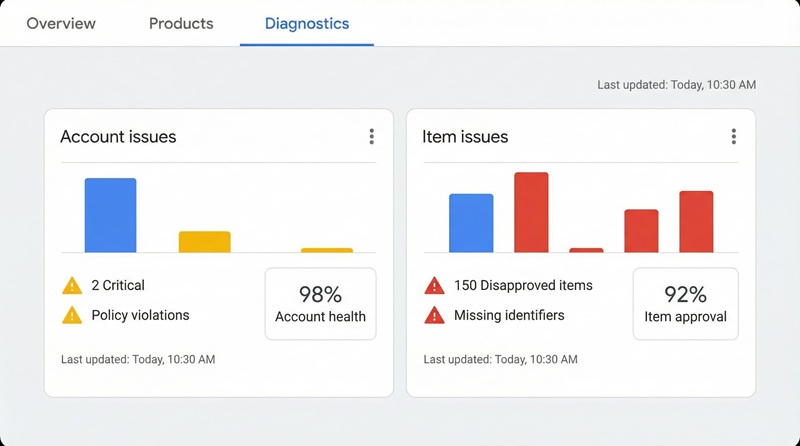
6. Google Merchant Center Product Disapprovals: Common Problems and How to Fix Them
Having products in Merchant Center does not automatically mean they are eligible to appear on Google. Google reviews submitted product information against its data requirements and shopping policies. A product disapproval can prevent that particular product from appearing in eligible shopping destinations. Account-level policy or setup issues can affect a much larger part of the catalogue.
Common reasons products get disapproved
- Missing or invalid GTIN, MPN or brand information.
- Price or availability differences between the feed and product page.
- Missing, inaccessible or unsuitable product images.
- Incorrect product descriptions or misleading information.
- Broken product landing page URLs.
- Missing shipping or return information.
- Incomplete business contact information.
- Website functionality or checkout problems.
- Product data that does not comply with Google's policies.
How to troubleshoot disapproved products
Start by opening the "Needs attention" section in Merchant Center. Review the affected products and identify the specific issue reported by Google.
- Export or review the affected product list.
- Group products by their reported issue.
- Identify whether the problem originates in the feed, product page or account configuration.
- Correct the underlying issue on the website or product data source.
- Refresh or resubmit the corrected product data.
- Request a review or appeal where the available process requires it.
- Monitor the updated product status.
Avoid repeatedly requesting reviews without correcting the actual problem. Fixing the underlying cause is more important than simply resubmitting the same product information.
7. Free Google Product Listings vs Paid Google Shopping Ads
Businesses sometimes assume that every product appearing on Google Shopping requires an advertising budget. That is not necessarily the case. Google offers eligible businesses opportunities to display products through free listings. These placements can help customers discover products without paying for each click.
Paid Shopping ads, on the other hand, use Google Ads to promote products through paid advertising campaigns. Campaigns can be managed through Shopping campaign formats and Performance Max, depending on the advertiser's objectives and setup.
What is the difference?
- Free listings: Eligible products may appear organically across supported Google shopping experiences without a per-click advertising charge.
- Shopping ads: Paid placements managed through Google Ads, with campaign budgets and bidding strategies.
- Performance Max: A goal-based Google Ads campaign type that can use product data from Merchant Center alongside other creative and campaign assets.
These approaches can complement one another. A business can establish accurate product information and free listing eligibility while developing paid campaigns to support specific commercial goals.
Remember: free listing eligibility does not guarantee impressions, rankings or sales. Results depend on product relevance, data quality, competition, availability and Google's systems.
Learn more: Free listings for products.
8. Merchant Center Optimization Is an Ongoing Process, Not a One-Time Setup
One of the biggest mistakes businesses make is treating Merchant Center as a platform that only needs attention during the initial setup. Ecommerce catalogues change continuously. Prices are updated, products go out of stock, new products are introduced and product images or descriptions are revised.
Without a regular optimisation process, product data can become outdated and inconsistencies can develop between your website and Merchant Center.
A practical ongoing management process should include:
- Regular product feed synchronisation and error checks.
- Monitoring product approval and visibility status.
- Reviewing product titles and descriptions.
- Checking image availability and quality.
- Monitoring price and stock consistency.
- Reviewing account notifications and policy issues.
- Analysing product impressions, clicks and performance.
- Updating product information when business or catalogue changes occur.
The goal is to maintain a reliable product data ecosystem that supports both customer experience and product discovery.
9. How Digital Asan Helps Businesses Set Up and Optimize Google Merchant Center
Setting up an account is only the first step. Building a reliable product visibility strategy requires the right combination of technical configuration, product data quality, ecommerce website optimisation and ongoing monitoring.
At Digital Asan, we help businesses strengthen their digital presence through practical, conversion-focused solutions. Our approach connects website performance, search visibility and customer experience with the business outcomes that matter.
Through our existing Asan Amplify service, businesses can explore opportunities to improve their existing websites through SEO, speed optimisation, conversion improvements and technical enhancements.
For businesses looking for Google Merchant Center support, the proposed service scope can include:
Google Merchant Center account setup
Business information configuration, website verification, account settings and product destination readiness.
Product feed integration and optimisation
Product data source configuration, attribute mapping, product title and description improvements, image checks and feed synchronisation.
Product disapproval analysis
Identification of product-level issues, feed inconsistencies, landing page problems and policy-related concerns, followed by an actionable correction plan.
Ecommerce website readiness
Reviewing product page quality, structured data, business information, shipping details, returns, checkout experience and other relevant website requirements.
Ongoing Merchant Center management
Monitoring product status, identifying new issues, maintaining product data quality and reviewing performance opportunities over time.
Every business has a different catalogue, platform and set of challenges. That is why the first step should be understanding your current setup rather than recommending the same solution to everyone.
Is Your Google Merchant Center Working to Its Full Potential?
Whether you are setting up Merchant Center for the first time, struggling with product disapprovals or looking to improve your product feed, Digital Asan can help you identify the next steps. Let's review your existing setup, understand your ecommerce goals and identify practical opportunities to improve your product visibility.
10. Frequently Asked Questions About Google Merchant Center
What is Google Merchant Center used for?
Google Merchant Center allows businesses to submit product information to Google. Eligible products can appear across supported Google shopping experiences, including free listings and paid advertising destinations.
Is Google Merchant Center free to use?
Creating and using a Merchant Center account does not require a subscription fee. Eligible products can appear in free listings without a per-click advertising charge. Paid Shopping campaigns require a separate Google Ads budget.
How long does Google Merchant Center setup take?
The time required depends on website readiness, account verification, product catalogue size, feed integration and any policy or data issues. A simple setup may be relatively quick, while a large catalogue or complex integration requires additional preparation and testing.
Why are my products disapproved in Google Merchant Center?
Common reasons include inaccurate product data, missing identifiers, price mismatches, unavailable product pages, image problems, missing business information and policy violations. Review the specific issue in the Merchant Center Needs attention section before making changes.
Can I list products on Google Shopping without running ads?
Yes. Eligible products can appear through Google's free listings programme without running paid Shopping campaigns. However, inclusion and visibility are determined by Google's eligibility and ranking systems.
How often should I update my product feed?
Product information should be updated whenever important details change, particularly price, availability, product URLs and images. Choose an automated or scheduled feed process that reflects how frequently your catalogue changes.
Can Digital Asan help with Google Merchant Center setup and optimization?
Digital Asan can help businesses assess their requirements and explore support for account configuration, product feed integration, product data optimisation, website readiness and ongoing Merchant Center management. The exact scope depends on the business and its existing setup.
Final Thoughts: Make Your Product Data Work Harder for Your Business
Google Merchant Center can be a valuable part of an ecommerce growth strategy, but its potential depends on much more than creating an account and uploading a catalogue. Accurate product information, strong product pages, reliable feed integration, transparent business policies and continuous monitoring all contribute to building a healthier product discovery ecosystem.
The businesses that approach Merchant Center as an ongoing optimisation opportunity, rather than a one-time technical task, are better positioned to maintain product data quality and respond to changing customer and platform requirements. Start with the fundamentals. Fix what is holding your catalogue back. Improve the experience customers see when they discover your products. Then keep optimising.
Better product data. Better customer experiences. Stronger product discovery opportunities.

Is Your Google Merchant Center Fully Optimized?
Identify product feed issues, discover optimisation opportunities and build a stronger product visibility strategy.
Request a Merchant Center Audit